Turn an objective into a plan
Break a complex objective into goals and tasks. Add optional phases, connect prerequisites, and define what success looks like.
The Windows MVP brings project planning, relevant context, AI-assisted task execution, human review, and reusable project knowledge into one working flow. We are refining everyday use and validating the application before early access.
Public early access is not open. This is a development update, not a release announcement.
Implemented capabilities in the development version. Availability depends on the workflow, supported formats, and provider configuration.
Break a complex objective into goals and tasks. Add optional phases, connect prerequisites, and define what success looks like.
Explore a map or an outline. Search for work, focus on dependencies, and open details and reviews alongside the plan.
Choose supporting documents and versions for a task. Review what will be used before starting AI work.
Run prepared tasks with supported AI providers or complete work manually. Keep saved results connected to the task.
Review outputs and approve suitable work. See how completion changes what is ready to do next.
Carry approved results and recorded decisions into later work. Keep the evidence and reasoning connected.
Review affected work when important information changes. Accept relevant updates to the plan with human oversight.
Read supporting documents, manage versions, and review text extracted from supported scanned material.
Use selected sheets and ranges as context, and create and review supported spreadsheet outputs. This is not a full Excel replacement.
Choose supported providers and inspect recorded usage. Costs are shown where known; unavailable prices are not treated as free.
Actual application-interface captures from development checks, using sample project data. These are not customer projects or a live workspace.
Windows MVP · Development interface
Browser-based acceptance captures; native-app release validation continues.
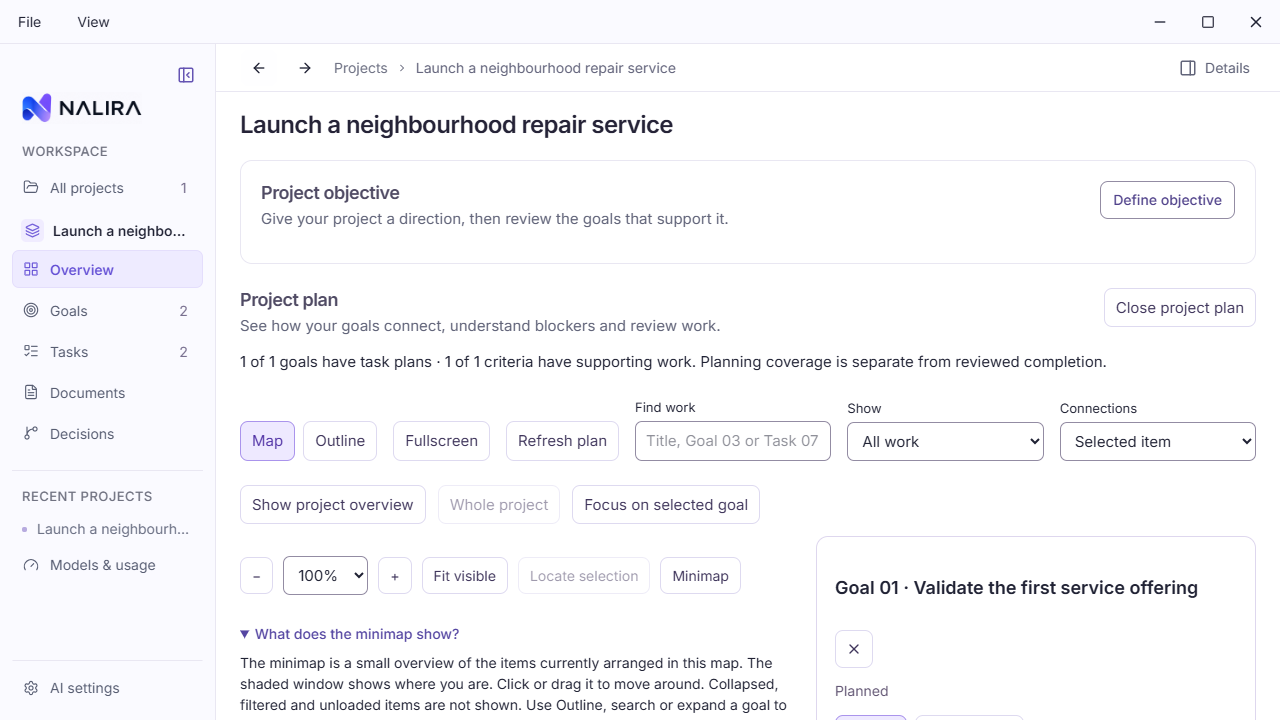
Start with an objective, connect goals and tasks, and explore the plan through a map or outline. Open the work you need without leaving the project behind.
Open full screenshotPassing automated checks is one part of this work. Installed-app and live-provider checks remain separate release requirements.
These are product directions, not available capabilities or promised delivery dates.
Planning, task execution, human review, and reusable knowledge now form a working development flow. The project map and outline help you navigate work, while supporting documents and selected spreadsheet material can give tasks useful context.
Our current focus is smaller-window usability, navigation stability, spreadsheet recovery, and validation of the installed Windows application. Early controlled agent workflows are also being checked.
Release acceptance now has an integrated evidence workflow. Automated checks alone do not establish release readiness; installed-app, upgrade, accessibility, and live-provider validation remain part of the work.
Explore the development screenshotsApplication release notes and version numbers will be published with qualified releases. Future updates will be added here as development milestones are verified.
What the development version can do, what stays under your control, and what is still ahead.
Nalira has a working Windows development build. Public early access is not open yet. You can register interest or follow development updates; no availability date has been announced.
The current MVP is a Windows desktop application. This website explains the product and shows development evidence. It does not provide a live project workspace. Production web and mobile versions are not available.
AI workflows require access to a supported provider and its configuration. Cloud providers may charge for usage. The development build supports ordinary tasks with OpenAI, Anthropic, Gemini, and local Ollama; the initial controlled agent integration uses OpenAI. Support and account access differ by workflow.
Yes. Planning, project organization, manual task work, and human review are part of the application. AI is an option within the work, not a requirement for every task.
Project workspaces are stored locally. When you choose a cloud AI workflow, the prepared context is sent to the selected provider. Review supporting material and provider settings before running. Local storage does not mean all processing stays on your device.
No. A generated draft is not a completed task. Human review and designation determine which results are approved and can support later work.
The initial agent capability is being validated. It proceeds through reviewed actions using selected material and can produce drafts. It does not provide unrestricted browsing, shell access, arbitrary external tools, or unattended control of an entire project.
We are refining everyday usability and validating the installed application, provider workflows, and upgrades. We will announce early access when those checks support it. Planned features are directions, not delivery commitments.
Register your interest in occasional development updates. For an early-user, design-partner, or investor conversation, contact Nalira.
Just your email. No message needed.